Why a Queue Feels Different from a Search
A streaming queue and search serve different jobs: learn how to find titles by a specific clue, verify results and preserve useful context for later.
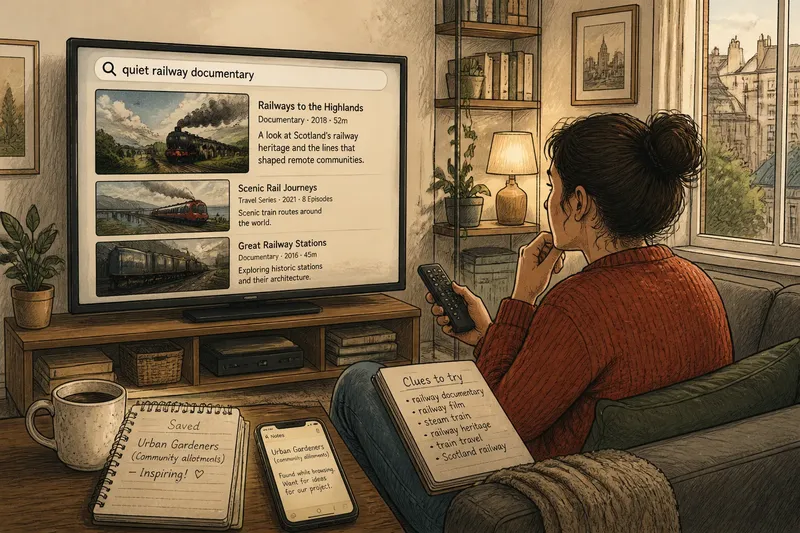
You open a streaming app to find a film for tonight, then spot a documentary you want to remember. Streaming search helps answer a specific question; a saved list keeps a title identifiable for later, even when you have forgotten where you saw it.
The distinction is less about choosing between two places to browse and more about the information each action preserves. Search works from a clue; saving works best when you retain the reason a title caught your attention.
Search by a useful clue
Start with the detail you can name: a title, performer, genre, language, setting or subject. Enter it in the service’s search box, then check the result’s description and format rather than relying on its poster.
If the results are too broad, add one specific clue. For instance, a search for “nature documentary” could be narrowed with a subject such as birds or a format such as a series. Change one part of the query at a time so you can tell which wording improves the results.
Search can also help identify a title you half-remember. Try a distinctive performer or phrase from the description, then check the year, cast or episode details to separate similarly named works. If the service does not recognise your wording, try a related term instead of adding several vague clues.
Save context, not just titles
A saved list is useful when it preserves a detail you might otherwise forget. Some services let you add a note; if yours does not, you can keep a brief note in your phone’s Notes app or a simple text file, using the title and the reason it caught your eye.
For example, say you see a documentary about urban gardens while browsing, but cannot watch it then. Save its title and note “community allotments” in Notes; later, that clue tells you why you kept it and helps you decide whether it still interests you.
Do not assume a button labelled “queue” sets playback order. On many interfaces, a saved list is a collection, while “play next” or “up next” controls affect what plays soon. Read the service’s labels before relying on a saved title to appear in a particular sequence.
Check results and availability
A search result may lead to a collection, a series or a title with a similar name rather than the exact work you meant. Open its details and confirm the description, format and language before selecting it.
Availability can vary between services and change over time. If a saved title is missing when you return, search its exact name in the service you are using and check the current availability information rather than assuming the list itself has failed.
Imagine you remember a film as a “quiet railway documentary” but cannot recall its title. Search that phrase, then try “railway film” when no exact match appears. If a result describes a travel series rather than a documentary, reject it; if another result matches the subject and format, open its details to confirm before saving or playing it. The decision comes from the title information, not from how closely its poster resembles your memory.
Search and saving questions?
Should I search by title or subject?
Use the title when you know it, since that is the most direct clue. If you are exploring or remembering a work, search by a distinctive subject, performer or setting, then verify the result details.
Why does search show similar titles?
Services may return related works, collections or titles with overlapping words. Check the description, cast and format, and try a more distinctive search term if the results remain ambiguous.
Can I add a note to a saved title?
Some apps offer notes or labels, while others only save the title. If there is no note field, use a phone note with the title and a short reminder of why you saved it.
Does a saved list control playback order?
Not necessarily: a saved list may only keep titles together. Look for a separate “play next” or “up next” control if you want to affect playback order.
Keep the clue useful
A search is strongest when you can describe what you are trying to identify or discover. A saved title is easier to use later when its reason for being there has not vanished.
When you return to a streaming search, start with the clue you remember and verify the result’s details. For saved titles, keep a short note when the title alone will not remind you why it mattered; that small bit of context makes the list more useful without turning it into another search.